
How do I send GIFs?
GIFs add personality and fun to your conversations! You can search for and send GIFs directly within your chats.
Sending a GIF:
- Go to the Chats tab and open a conversation
- Tap the GIF icon in the message input area
- Search using keywords or browse trending GIFs
- Select a GIF and tap Send
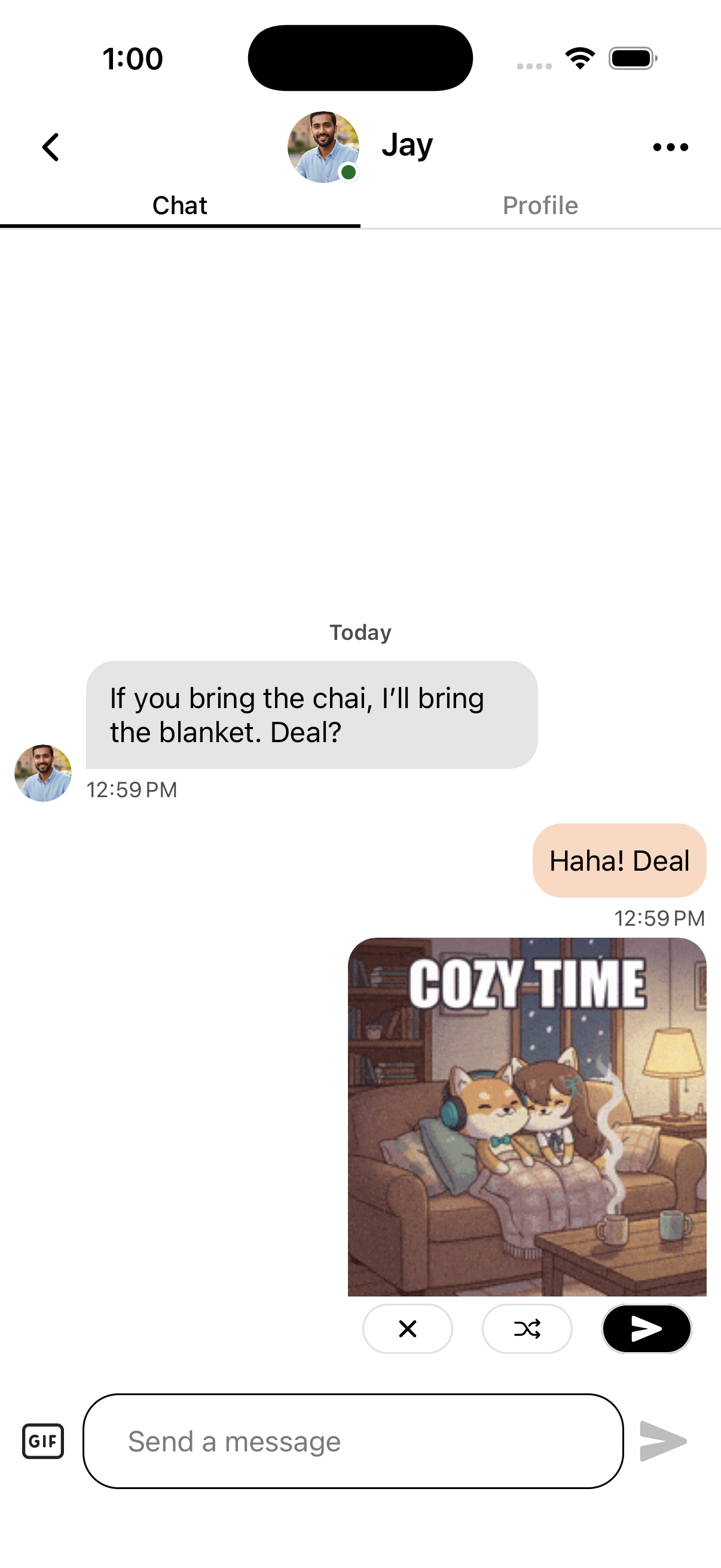
- The GIF preview appears in the chat
- Before sending, you can:
- Tap the shuffle icon to see alternative GIFs with the same search term
- Tap the send icon to send the GIF
- Tap the X icon to cancel
GIF Tips:
- Use specific keywords when searching to find the right GIF
- Don't like the preview? Use the shuffle icon to see other options before sending
- GIFs add personality and humor to conversations
- You can't reply to GIFs, but you can react with emojis
- GIFs load automatically when your match opens the conversation
If GIFs Aren't Working:
- Check your internet connection
- Make sure you have the latest version of the OtterHalf app
- Try different search terms if you're having trouble finding GIFs