
How do I delete my account?
We're sorry to see you go! If you've decided to delete your OtterHalf account, here's how to do it safely and permanently.
⚠️ Important: This Action Cannot Be Undone
Deleting your account will permanently remove:
- • Your profile and photos
- • All your matches and conversations
- • Your preferences and settings
- • Any unused premium features or credits
Consider These Alternatives First:
•
Pause your account: Hide your profile temporarily without losing your data
•
Update your preferences: Change who you see and who sees you
•
Take a break: Simply don't open the app for a while
How to Delete Your Account:
- 1Open the OtterHalf app and go to the Profile tab (bottom navigation).
- 2Tap the Settings gear icon in the top right corner of the Profile screen.
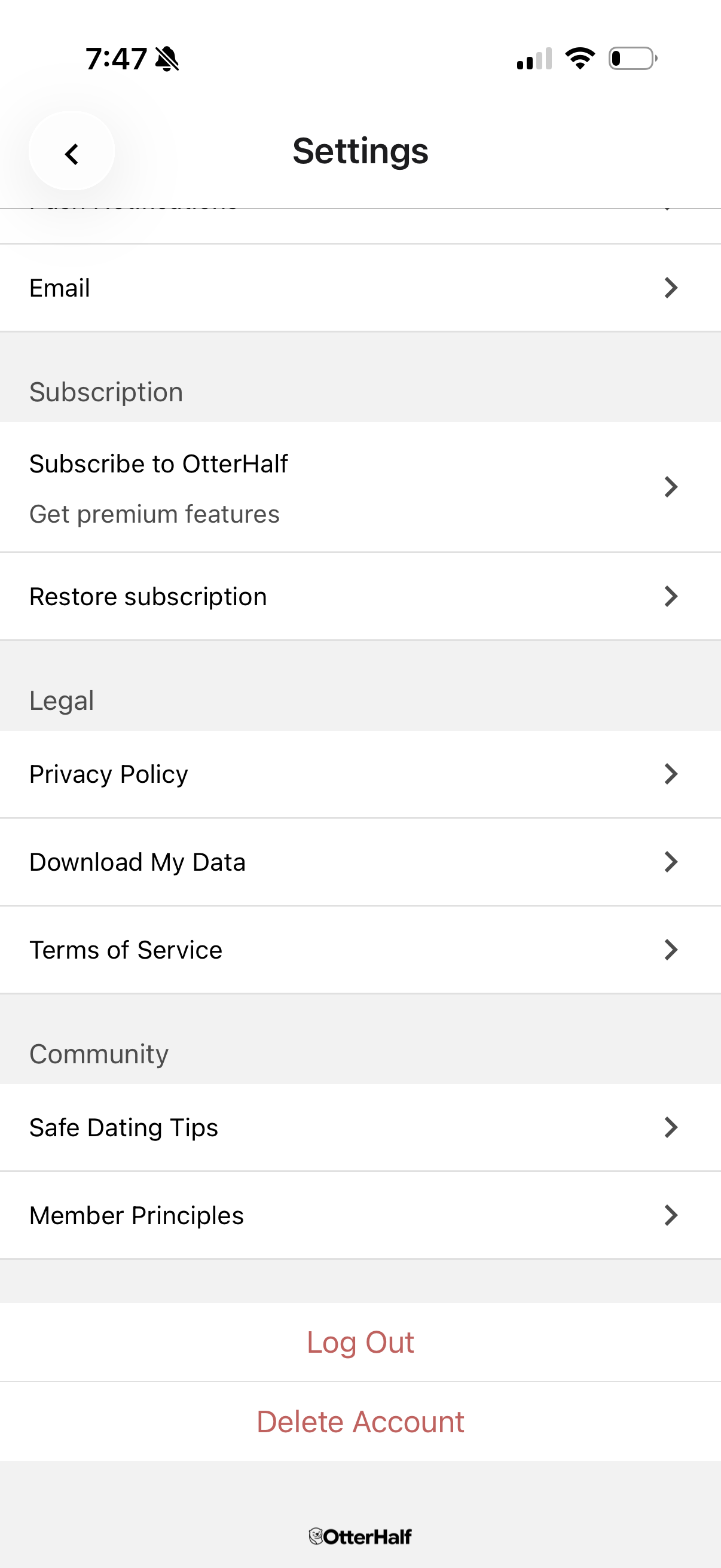
- 3Scroll down to the bottom of the Settings page and tap Delete Account.
- 4A modal will appear with two options:Pause Profile or Delete Account. Tap Delete Account.
- 5Select a reason for deletion from the list provided. If you select Other, you may be asked to provide additional feedback.
- 6Tap the Delete Account button to confirm. Your account will be permanently deleted and you will be signed out.
Note: Providing feedback about why you're deleting your account is optional, but we'd love to understand your experience so we can improve OtterHalf for everyone.
Processing Time: Account deletion is immediate, but it may take up to 24 hours for your profile to be completely removed from our servers.
What Happens After Deletion:
- 1Your profile disappears immediately from other users' discover feeds.
- 2All your matches will no longer be able to see your conversation history.
- 3You can create a new account anytime using the same phone number.