
How to report someone
Your safety is our priority. If you've had a concerning experience on OtterHalf, we encourage you to report it so we can take action.
Reporting from a Profile:
- Locate the three dots icon in the top right corner of the profile or chat screen.
- Select Report, then choose the reason that best describes the issue (e.g. I'm not interested, Inappropriate behavior, Profile is fake or scammer).
- After submitting your report, the user's profile will be removed from your view.
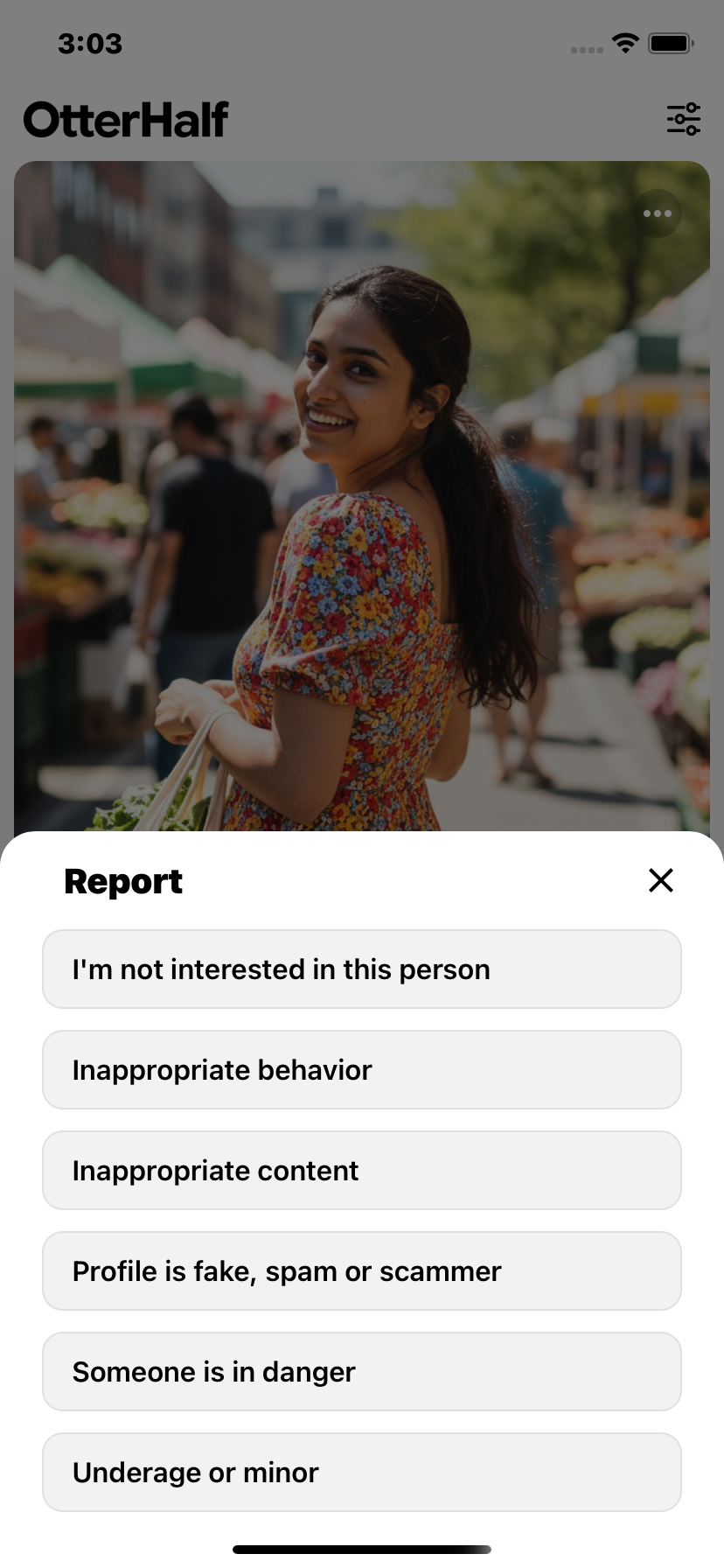
To report someone from a chat, see Reporting someone in a chat.
All reports are handled confidentially and cannot be undone. Once you report someone, their profile will no longer appear in your feed, and your profile will be hidden from theirs.
If you report someone from your Matches, you will immediately disappear from their view as well. They will not be able to access the previous conversation or match history.
Alternative reporting methods
If you're unable to submit a report through the app, you can contact us directly with the following information:
- The specific reason for your report
- Complete profile details including name, age, bio, and photos (screenshots are preferred)
- Any additional identifying information that may assist our investigation:
- Phone number
- Email address
- Social media profile links
When using our support form, please select Safety and Reporting as your issue category.
We treat every report with the utmost seriousness. Providing comprehensive details helps us investigate quickly and take appropriate action to protect our community.
To learn more about our reporting process, review our Terms of Service. If you need further assistance, you can contact support.